
Recommended workflow
Good practices: review the member with.userinfo @Member, choose an action with a clear reason, and verify the record with .case <ID> or .cases. Sanctions and individual role changes create moderation cases and log events.
Note:
Fake Permissions can satisfy some compatible moderator checks, but never gives
Headless native Discord permissions. The bot’s own permissions and Discord
role hierarchy still apply. Setup reports configured-log failures instead of silently replacing it.
Staff roles shared with Strip Staff
.bind staff @role toggles a normal server role in the list shared by Strip Staff and Dashboard Staff Roles. .bind staff list displays the configured roles. The command requires the server owner or an authorized Anti-Nuke Admin, and Headless must be above the role. @everyone and integration-managed roles are rejected; the list is limited to 120 roles. Changes are stored per server and written to the security log. This list does not grant Anti-Nuke Admin access, add a whitelist exemption, or bypass other protections.
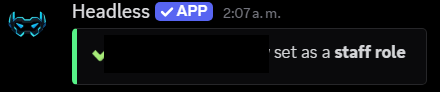
Real Headless confirmation after adding a staff role; the member and role mentions were redacted. The captured response is in Spanish.
Member actions
Ban, kick, and timeout have prefix and slash commands. The reason is optional; when omitted, Headless recordsNo reason provided. The server owner and bot cannot be targets; every target must be below both the moderator and Headless. The server owner can bypass only the moderator hierarchy check. Timeout accepts 30m, 2h, or 1d, up to 28 days.
For slash commands, select the member and optional reason in Discord’s option picker; those fields are not typed after the command name.
Ban
Kick
Timeout
Initial setup
1
Check permissions and hierarchy
For
.setup, you must be the owner or have Manage Server / Administrator; Headless needs Manage Roles and Manage Channels, or Administrator. Role hierarchy still applies.2
Set up Jail and logs
Run
.setup and review Created, Existing, and Failed before using Jail.3
Set up mute roles
Run
.setupmute; review channel failures and fix permissions or hierarchy before rerunning.4
Customize messages if needed
.invoke can customize acknowledgements and DMs by action; it is not required to enable sanctions..setupmute also requires the caller to be the owner or have Manage Server
/ Administrator. Headless needs Manage Roles or Administrator, and its
role must stay above each mute role.What .setup creates
What .setup creates
It uses the configured log channel when Headless can resolve and access it
to view, send messages, and embed links. Otherwise it reuses
#jail-log or
creates a private channel. If the configured channel exists but lacks
permissions, setup reports the failure instead of silently replacing it.
It also creates or reuses the Jailed role and private Jail channel; once
setup succeeds, Jail is enabled and saved per server. A partial failure does not mean earlier changes were rolled back.Roles and results from .setupmute
Roles and results from .setupmute
It creates or reuses
Muted (messages and threads: prevents writing and creating public or private threads), Image Muted (prevents attaching files), and Reaction Muted (prevents adding reactions). Permission overwrites are applied to
supported categories and channels; synced channels use their category’s
overwrite. It cannot use @everyone, managed roles, roles with
Administrator, or roles at or above Headless. The result separates created
roles, reused roles, and channel failures; role IDs are stored per server.Cases, logs, and limits
Cases, logs, and limits
Cases, logs, and limits
Prefix-command permission or access-check denials go to the denial log when
a destination is available. Other Discord errors and slash commands may use
different responses or logging paths. The runtime controls automatic command-message deletion; no published Dashboard control was found.
Cooldowns are defined per command, with no verified Dashboard control to
adjust them.
Customize acknowledgements with .invoke
Customize acknowledgements with .invoke
It accepts
jail, kick, ban, hardban, timeout, and warn. message
customizes the command response; dm customizes the private message to the
target. Each combination is stored separately; .invoke list shows which differ
from defaults and .invoke <action> reset removes only that action’s custom
text.
Templates are validated before saving. The caller must be the owner or have
Administrator or Manage Server. tempban and softban are not
implemented.Forced nicknames
.forcenickname <user> <nickname> stores a server-scoped rule and reapplies it when Discord reports a nickname change. The nickname from before the first change is kept for later restoration.
Aliases, permissions, and nickname limits
Aliases, permissions, and nickname limits
The rule is reapplied best-effort when Discord reports a nickname change.
Prefix aliases include
.fnick, .fn, .forcenick, .forzarnombre,
.forcenames, and .locknick. .unforcenickname <user> or
.forcenickname <user> off removes the rule; omitting the nickname in the
prefix command also removes it. /fnick accepts an optional nickname.
.forcednames and /forcednames list up to 25 rules; the slash command
responds privately. Both the caller and Headless need Manage Nicknames.
Nicknames are limited to 32 characters and cannot target the server owner or
the bot. The rule and original nickname are stored per server.Manual role management
.role @user @role toggles a role. Individual changes validate the member and role, and create a case and log when applied.
.role add accepts multiple roles separated by commas, semicolons, |, or +; a trailing --reason <text> records the reason. The subcommand parses this from its free-form payload rather than as a command-framework argument.
.role
.role add
.roleall
Manage Roles (native or through
compatible Fake Permissions) and Headless’s native Manage Roles. Hierarchy
still applies; @everyone and integration-managed roles cannot be changed.
Roles with Administrator require native Administrator, the server owner,
or the Headless owner.
.rolesadmin delete deletes the server role and may remove it from every
member who has it; the callback has no confirmation or case/log flow. Verify
the role before running it..roleall changes many members without confirmation and only scans members
available in the cache. It skips bots, members who already have the role, the
owner, and targets outside the hierarchy; it reports additions, skips, and
failures. The prefix command has a 30-second per-server cooldown; /roleall
does not register that cooldown.
.rolesadmin variants
.rolesadmin variants
The group provides
add, remove, toggle, list, and delete; .ra /
.roleadd add roles, and .roleremove / .removerol remove them. See
Roles for restoration and member self-service panels.Bulk actions and hardban
Mass timeouts and unban
Mass timeouts and unban
.cleartimeouts [reason] and /cleartimeouts reason:... clear active timeouts and process members available in the current cache in batches.
Both the moderator and Headless
need Moderate Members. It skips targets outside the moderator’s hierarchy,
writes a summary log, and may partially complete; it does not roll back
actions already applied.Unban and hardban
Unban and hardban
.unban <ID> [reason] and /unban user_id:<ID> reason:... need a numeric ID
and Ban Members from both the caller and Headless. Regular unban is blocked
for a member on the persistent hardban list. .hardban requires Ban Members and Anti-Nuke Admin access; it presents approve/reject controls and
checks hierarchy. Confirming deletes up to seven days of messages and
reapplies the ban if someone unbans the user while the record is active.
Use .hardban remove <ID> to remove the record and unban the user; if
Discord returns a permission or HTTP error, Headless restores the record. .unban is not a
substitute. For a normal removal: .unban 123456789012345678 reason.Recreate a channel with .nuke
The caller needs Manage Channels and Anti-Nuke Admin access (the server owner
also passes that gate). Headless needs Manage Channels, View Channel, and
Send Messages; the prefix command also checks that Headless has Manage Messages. The channel is cloned with its settings and position. If a Discord
operation fails after the original is deleted, the replacement may remain even
though the command did not finish with its normal confirmation.
1
Run it in the target channel
Use
.nuke inside the text channel you want to recreate. /nuke is also available.2
Review the confirmation
Verify the target and irreversible loss of message history before choosing Approve.
3
Check the replacement
Headless keeps the channel settings, records a case and log, and does not restore previous messages.
Cases and verification
.cases @Member lets moderators review the member’s cases; .case <ID> shows one record. For operational follow-up, check the caller’s and Headless’s native permissions, then review the log after acting.
The public text prefix is
.. The Commands catalog keeps the registered syntax and aliases; its 45 Moderation entries were checked against the current registry and callbacks.