
Overview
How a response is decided
The engine receives Discord events, attempts to attribute them throughView Audit Log, checks the explicit whitelist, and evaluates the module policy. Activity windows are separated by actor, module, and action; cooldown helps prevent repeating a punishment during a burst already contained. If Discord has not yet verified the actor, Headless must not punish a random person. Security logs retain detection, enforcement, failures, cooldowns, whitelist changes, backups, and restores.
Observed activity and enforcement
Anti-Nuke records more activity than it can automatically punish. Expand the scope below to see which events are observed and which can trigger enforcement.Recorded events and automatic enforcement
Recorded events and automatic enforcement
Coordinated activity
In addition to actor-attributed activity, the engine can correlate qualified events from multiple accounts within an internal window. This is not an exemption or a policy configurable through the eight module commands; Headless does not publish the correlation thresholds.AutoMod and content safety
AutoMod and content safety
automod_weakening detection watches changes to native rules but does not create them or moderate messages.Sentinel applies message analysis only while enabled. Its response also depends on mode, Simulation, the relevant engine, and effective Discord permissions; the dedicated guide documents the source-verified bounds and action behavior.The .automod and .automod content-exemptions commands require the server owner or configured Headless owner and open a panel in the current channel. Use a private staff channel. The dedicated guide explains each exemption scope, the .automod announcement-role command, and why native Discord rules must be managed in Discord.Configure Anti-Nuke
Separate access controls
The server owner manages access and owner-only operations. Anti-Nuke Admins can configure most settings but are not exempt from protections. Fake Permissions authorizes compatible virtual Headless command checks; it does not change native Discord permissions or create Anti-Nuke exceptions..an admins requires native Manage Server; reset confirmations revalidate the actor.
Anti-Nuke Admin access
Whitelist exemptions
The whitelist exempts only accounts explicitly added; it does not grant administrative access. Verify the target before saving an exemption.
Historical Headless reply captured before the response copy was updated to English; the actor and target mentions are redacted.
Smart Setup and profiles
The built-in recommendation is read-only; it does not save or apply changes. Open Smart Setup in Dashboard → Anti-Nuke → Smart Setup as the owner or an Anti-Nuke Admin. The preview shows the analysis and changed fields; it expires after 10 minutes, is bound to the session and server, and is invalidated if the configuration revision changes. Cancel does not persist the plan.How a profile is selected
How a profile is selected
@everyone) with Administrator; then Maximum at 10,000 members; Gaming at 35 unmanaged roles or 12 bots; Business / Staff when a role name contains staff, team, business, or empresa; Creator at 6 bots; otherwise Community. The first matching rule wins.stripstaff; Maximum applies ban and the strictest security baseline. Applying a standard profile enables Anti-Nuke in Auto mode and turns Simulation off; review the preview first.
Available profiles
Available profiles
- Community: balanced baseline (
balanced); base punishmentstripstaff. - Gaming: strict protection for active servers; base punishment
stripstaff. - High-Admin / Gang: reinforces servers with many
Administratorroles; base punishmentstripstaff. - Creator: reinforces configurable protections for creator communities; base punishment
stripstaff. - Business / Staff: strict configuration for staff teams; base punishment
stripstaff. - Maximum Security: enables the strongest available baseline and uses
banas its base punishment. - Custom: keeps the current configuration, applies only reviewed decisions, and uses
stripstaffas its base punishment.
Manage Channels and other escalation permissions to trusted roles: this permission can let an actor disrupt or reconfigure channels.
Monitor, Auto, and Simulation
The recommended initial setup is Monitor with Simulation enabled. Monitor records activity without punishment; Simulation tests detections without changing members, roles, channels, or bots. Auto applies real responses when Simulation is disabled. Switching to Auto and using.an strict require the owner. .an on restores the last saved mode and may re-enable Auto.
Informational test
.an test records an informational test without applying punishment. It also
enables the engine if it was off.Module options
Each subcommand acceptson, off, or status. Flags depend on the module’s
registered capabilities; the signatures below match Headless’s current parser.
botadd has no threshold, configurable punishment, or --command flag.
.antinuke ban
.antinuke kick
.antinuke role
.antinuke channel
.antinuke emoji
.antinuke webhook
.antinuke
Threshold
Threshold
--threshold sets how many actions within a module’s window trigger a
response. Available thresholds accept 1–50; neither vanity nor botadd
accepts --threshold.Punishment
Punishment
--do selects none, warn, jail, kick, ban, or stripstaff.
botadd has no configurable punishment.Command detection
Command detection
--command flag counts moderation actions started through Headless
commands; --command is supported only by ban, kick, and role.Available modules
Each module keeps its own configuration. Subcommands accepton, off, and
status; for botadd, only on and off change configuration, while
status is a read-only query.
Bans, kicks, and roles
Bans, kicks, and roles
ban, kick, and role modules accept thresholds, punishments, and
--command, which can count actions started through Headless commands.Channels, emojis, and webhooks
Channels, emojis, and webhooks
channel protects channel creation and deletion; emoji protects emoji
deletion; and webhook protects webhook creation. They accept thresholds
and punishments, but not --command.Vanity URL and bot additions
Vanity URL and bot additions
vanity watches URL changes and allows a punishment, but Discord does not
let Headless restore the URL (.antinuke vanity on --do stripstaff). For
botadd, on/off toggle the setting and status only reads it; in Auto,
Headless may remove an unauthorized bot when Discord permissions and
hierarchy allow it.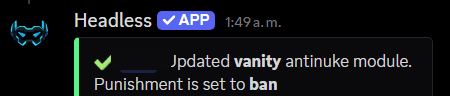
Actual Headless reply to .antinuke vanity on --do ban; the user's mention is redacted.
stripstaff, configure and review protected roles with
.bind staff and .bind staff list.Prefix commands and syntax
The prefix group is registered as.antinuke; .an is a shorter alias. It also accepts .anti-nuke, .sentinel, .sent, and .sen. The examples use the public prefix ..
Queries and analysis
Queries and analysis
.anshows group help;.an statusand.an monitorcheck status and monitoring signals..antinuke configshows this server’s configuration. This read-only query is available to the owner or an Anti-Nuke Admin..antinuke list [category=all]opens paginated guild lists or a category detail; omit the category to queryall.
Admins and exceptions
Admins and exceptions
.an accessopens the Anti-Nuke Admin and whitelist panel..antinuke admin [user] [action=toggle]acceptstoggle,add, orremove; omitting it toggles access. It is owner-only and does not change the whitelist..an adminslists admins and requires nativeManage Server..antinuke whitelist [target] [action=toggle]acceptstoggle,add, orremove; omitting it toggles the exception. Only the owner can change it; the target can be a member or an external bot ID..an whitelist listand.an whitelist usersare read-only queries available to the owner or an Anti-Nuke Admin. Whitelist mutations,.an whitelist here @user, and.an whitelist everyone @userare owner-only..antinuke permissions <grant|remove> <permission> [--do <none|warn|jail|kick|ban|stripstaff>]configures the response for watched permissions; owner or Anti-Nuke Admin access is required..an permsis an alias.
Mode and modules
Mode and modules
- Each module has its own syntax card under Module options; use only the flags listed for that module. For
botadd,onandoffchange the setting;.antinuke botadd statusonly reads it. .an mode monitor|autochanges the mode; selecting Auto is owner-only..an onrestores the last mode and.an offdisables Anti-Nuke (owner-only)..an strictis owner-only and may start real enforcement..an maxis available to Anti-Nuke Admins and can also start real enforcement..an punishment [action]checks the global punishment; changing it is owner-only..an instant on|off|status [ban_threshold] [ban_window]is owner-only and accepts 2–10 bans in a 10–120-second window.
Logs, backups, and recovery
Logs, backups, and recovery
.an logs [#channel]checks or changes dedicated logs and requires Anti-Nuke Admin..an alerts on|off|status [#channel] [dm-on|dm-off]configures owner alerts and is owner-only..an backup status|list|create|show|preview|restore|delete [ID]|on|off|every [hours]checks, creates, previews, schedules, or deletes snapshots; a real restore requires the owner and an explicit ID..an reset whitelist|bansrequests confirmation, rechecks the owner or Anti-Nuke Admin, and can clear the whitelist or unban everyone and remove hardbans;.an clearwhitelistis another confirmed reset that only clears the whitelist.
.antinuke list
.antinuke botadd
The status query does not change configuration. Use on or off only when
you intend to change the module state.
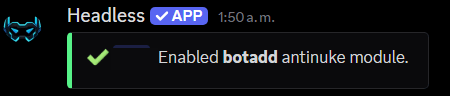
Actual Headless reply (in English) to .antinuke botadd on; the user's mention is redacted.
.antinuke permissions
Staff roles and alerts
stripstaff removes configured staff roles that Headless can manage under current permissions and hierarchy. .bind staff @role toggles a role in the shared list used by Anti-Nuke Strip Staff and Dashboard Staff Roles; .bind staff list displays the list. The legacy settings staff alias may exist on installations that still expose it. .an restorestaff @member attempts to return saved staff roles, but cannot bypass permissions, hierarchy, or roles that no longer exist. Owner alerts can go to a channel and, if enabled, DMs; dedicated security logs retain evidence and do not change policy by themselves.
Member protection DM: the first explicit Anti-Nuke activation enables this option if the owner has not initialized it before; later activations preserve the owner’s choice. While Sentinel is enabled and the option remains on, each new human member receives a best-effort informational DM. Delivery runs separately and does not delay join protection. A member who cannot receive DMs is silently skipped. The built-in copy starts with Headless · Active protection, explains the protection, and uses a staff-managed footer. When settings are loaded, Headless replaces only the exact former built-in Spanish strings; customized text is preserved.
Commands
Slash commands
Headless registers/antinuke recommend, status, access, list, admins, monitor, backup, backupnow, backuplast, backuptest, backuprestore, mode, disable, botadd, logs, alerts, instant, dashboard, admin, whitelist, reset, and punishment. Queries marked private by their handler respond ephemerally. Most commands require the owner or an Anti-Nuke Admin. Unlike the prefix .an admins, which requires native Manage Server, /antinuke admins uses the owner or Anti-Nuke Admin configuration gate. /antinuke admin, whitelist, backuprestore, disable, logs, alerts, instant, punishment, and selecting Auto in mode require the owner. /antinuke reset uses confirmation and rechecks the actor but does not use the same owner-only gate as those commands.
Note:
Run slash commands from Discord’s command interface. Check their options and
permissions in the catalog; most require the owner or an Anti-Nuke Admin and
private queries respond ephemerally.
.an reset bans can unban every member and remove hardbans after confirmation.
Verify the target server and review the impact before confirming this
irreversible action.Backups and recovery
Snapshots may include roles, channels, permission overwrites, and role-to-member assignments. The default schedule creates one every 6 hours and keeps 12 retained copies. Each capture is limited to 250 resources and 5,000 member-role links; the view reports omissions. Viewing, creating, previewing, scheduling, and deleting snapshots requires Anti-Nuke configuration access. Only a real restore requires the server owner or Headless owner; previews are available to members with configuration access. A real restore also needs an explicit ID. A preview does not change Discord or guarantee a perfect reconstruction: resources may have new IDs, and Discord still applies hierarchy, capacity, and rate limits.View and create snapshots
The subcommand accepts actions such asstatus, list, create, show,
preview, restore, delete, on, off, and every. Use an ID only for
actions that target a specific snapshot.
.antinuke backup list
Preview a restoration
A preview calculates the changes without modifying Discord. Use the ID shown in the snapshot list.Restore a snapshot
Only the server owner or Headless owner can run a real restoration, and an existing snapshot ID is required.Schedule snapshots
Scheduling uses hours and the number of retained snapshots. The command clamps values to the ranges supported by Headless.Discord permissions and limits
View Audit Log is essential for attribution. Depending on the response, Headless may also need Manage Roles, Manage Channels, Manage Webhooks, Ban Members, Kick Members, or Moderate Members. The bot role must be above what it manages. Headless cannot punish the owner, manage higher roles, or prevent an action Discord has already accepted. Review partial results and failures in the logs.
Safe initial setup
Analyze without changing settings
.an recommend; it does not save changes.Preview Smart Setup
Adjust modules and access
Test and verify
Troubleshooting and quick answers
A risky action was detected, but no punishment ran
A risky action was detected, but no punishment ran
Do Anti-Nuke Admin or Administrator exempt someone?
Do Anti-Nuke Admin or Administrator exempt someone?
Administrator is a native Discord permission; neither creates an exemption. Only an explicit whitelist entry exempts a user or bot.